Development isn’t what it used to be
For a long time, “development” meant one thing. It meant writing code. If you weren’t a developer, the word wasn’t really about you. You wrote up what you wanted, handed it to engineering, and waited.
That’s still true for a lot of software, and skilled developers aren’t going anywhere. But something new is happening alongside it. Today a knowledge worker, a domain expert, or a founder who has never written a line of code can sit down with AI and build a real, working product. So let’s widen the word right now, because everything in this article depends on it. Development is no longer only writing code. Development also means building products with AI. And if that’s what you’re doing, then development is exactly the work you’re doing.
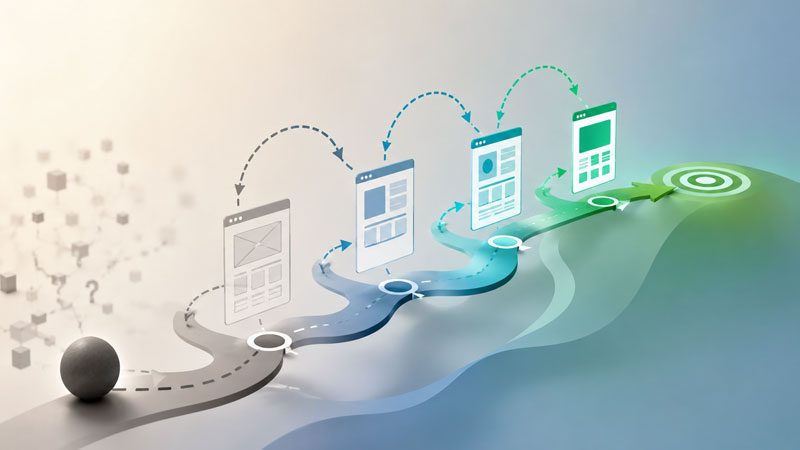
Here’s what I’ve noticed building this way. You almost always know what you want. You have the product in your head. You’re starting at point A, today, with nothing built, and you know you want to get to point B, the product you’re picturing. That’s your plan, and having one matters. It’s the difference between building and just messing around.
What you don’t have is the route. From where you’re standing at A, you can’t see every turn between you and B. And this is where most people go wrong: they try to draw the entire route on paper first, lock it down, then execute it step by step. It feels responsible. It’s actually the slowest and most fragile way to build, because some ideas simply cannot be judged until you see them running.
Prototype Driven Development is the alternative. It’s a way of building where you keep your plan but hold it loosely, prototyping your way from A to B and letting what you learn reshape the plan as you go. You don’t guess the route from the safety of a document. You discover it by building.
The trap: a plan you’re afraid to change
Most of us were taught to plan first. Write the document, think it all through, get it right on paper, and then build exactly what the document says. The plan becomes a contract. Changing it feels like failing.
For building products with AI, this is exactly backwards. When your plan is a contract you’re scared to break, every new thing you learn becomes a threat instead of a gift. You discover halfway to B that a feature you were sure about feels clumsy in practice, and now you have a choice: admit the plan was wrong, or keep marching toward a B you no longer believe in. Most people keep marching, because the plan said so. That’s how products end up technically finished and quietly wrong.
The honest truth is that some ideas cannot be judged in your head or on paper. You can describe a screen in a document and feel great about it. Then you see it running, you tap through it, and within ten seconds you know it doesn’t work. No amount of additional planning would have told you that. You had to build the thing to find out.
So the problem isn’t that you made a plan. You should have a plan. The problem is treating the plan as fixed when the whole point of building is to learn. What you actually need is a plan that bends, one that gets smarter every time you discover something, instead of one that cracks the moment reality disagrees with it.
That is the entire job of Prototype Driven Development: to give your plan a way to keep learning and to keep evolving without falling apart.
What Prototype Driven Development actually is
Prototype Driven Development is a simple loop that you run over and over while building your product. Here is the whole thing:
- You work your plan. You’re building toward B, following the route you’ve mapped so far.
- You hit a decision you can’t make on paper. Two layouts might work. A mechanic might be fun or might be annoying. You genuinely don’t know, and thinking harder won’t tell you.
- You spin off a prototype. Not the real product. A fast, cheap, throwaway version built only to answer that one question.
- You learn from it. You click through it, react to it, try variations, and form a real opinion based on something you can actually see and touch.
- You update the plan. You take the decision you just made and fold it back into your plan, so the plan is now smarter than it was an hour ago.
- You keep building, until the next decision you can’t make on paper. Then you do it again.
That’s it. That’s the method. You prototype your way from A to B, one uncertain decision at a time, and your plan gets sharper with every loop instead of going stale.
One caution, because it matters. You do not prototype every decision. Most decisions you should just make and keep moving, because prototyping has a cost and a builder who prototypes everything never ships. PDD is for the small number of decisions that genuinely matter and that you genuinely cannot settle any other way. The skill is knowing which ones those are.
Notice what the prototype is for. It isn’t a rough draft of the product that you’ll polish later. It’s a probe. Its only job is to produce an answer. Once you have the answer, the prototype has done its work, and what you carry forward is the decision, not the code.
Here’s the part most planning methods won’t admit. Sometimes you set out for B, and what you learn along the way is so significant that B stops being the right destination. You prototype an idea, you see it running, and you realize the better product is actually slightly to the left of where you were headed. You end up at C instead of B. That is not the method failing. That is the method working exactly as intended. A rigid plan would have dragged you all the way to a B that no longer made sense. PDD lets you notice, in time, that C was better all along.
It helps to say plainly what PDD is not. It is not rigid upfront planning, where you decide everything in advance and then refuse to change it, and pay for it by shipping things you no longer believe in. And it is not “vibe coding,” where you generate and tweak endlessly with no plan, and pay for it by never knowing if you’re actually getting closer to a product. PDD keeps the plan from the first approach and the build-to-learn instinct from the second.
The prototype is a probe, not the product
This is the idea that makes everything else work, so it’s worth slowing down on.
When most people hear “prototype,” they picture an early, rough version of the real thing, something you’ll clean up and grow into the finished product. Drop that picture. In PDD, a prototype is a probe. You send it out to answer a question, it comes back with an answer, and then you throw it away. The code was never the point. The answer was.
Once you really believe this, something freeing happens. The prototype’s code does not have to be good. It doesn’t have to be clean, or well structured, or tested, or built the way your real product is built. It can be held together with tape. None of that matters, because it’s never going into your product. That’s exactly why a prototype can be fast and cheap: you’ve given yourself permission to skip everything that makes real software expensive, because you’re not making real software. You’re asking a question.
The thing you actually keep is the learning:
We tried three layouts and the second one felt right. Players found the timer stressful in a good way. That feature we were excited about turned out to be confusing.
Those sentences are worth more than any code the prototype contained, and they’re the part that flows back into your plan.
This is also why the most tempting mistake in prototyping is to reuse the prototype’s code in the real build. It feels efficient. You already wrote it, why waste it? But the moment you do that, the throwaway code stops being throwaway, and all the corners you were allowed to cut are now corners cut in your actual product. Worse, you start protecting the prototype’s choices because you’re attached to the code, instead of choosing what’s actually best. Keep the learning. Throw away the code. Every time.
Prototype Driven Development in the wild: building Sagitta Chains
Let me show you what this looks like in a real project instead of in theory. Sagitta Chains is a game I’m building. Here’s a slice of how the project is actually organized:
sagitta-chains/
  docs/
    build/
      v0.8.0-mechanic-validation/
      v0.9.0-design-validation/
      v1.0.0-feature-complete/
        design.md
        tasklist.md
      feature-backlog.md
    prototypes/
      arrows-prototype/
      timer-pressure-visuals/
      v0-9-direction-selector/
      v1-bottom-bar-layout/
      v1-powerup-and-pause-overlay/
      v1-sound-design/
Two things in here tell the whole story.
First, look at the prototypes/ folder, and notice it sits completely apart from build/. That separation is not an accident, it’s the discipline made visible. The prototypes live in their own space so that a throwaway experiment can never accidentally leak into the real product. This is exactly the “throw away the code” rule from the last section, enforced by where the files even live. When a prototype is done, I don’t have to carefully untangle it from my build, because it was never tangled into it in the first place.
Second, look at how the prototypes are named: timer-pressure-visuals, v1-bottom-bar-layout, v1-powerup-and-pause-overlay. Every one is named for a question, not a feature. timer-pressure-visuals isn’t “the timer.” It’s “how should the timer make the player feel pressure?” These are probes, and their names are the questions I sent them out to answer.
Now look at the build/ folder, and you can watch the loop repeat across the product’s life. The milestones aren’t named v0.8, v0.9, v1.0 by accident either. They’re named mechanic-validation, then design-validation, then feature-complete. Each version was its own pass of the same loop, validating a different layer of the game before moving on. And the prototypes span those versions too, some tagged v0-9, some tagged v1, because prototyping didn’t happen once at the start. It kept happening, every time I reached a new decision I couldn’t make on paper. The plan kept evolving, version after version, and it’s still going.
Anatomy of a prototype: the prototype.md
Let’s open up that v1-powerup-and-pause-overlay prototype and look inside:
v1-powerup-and-pause-overlay/
  reference/
    current-in-game.png
    current-main-menu.png
    powerups-sample.png
  index.html
  prototype.md
Look at how little is here, and how telling it is. There’s a single index.html. That’s the entire prototype, one self-contained file you open in a browser, no build process, no dependencies, the cheapest possible thing that can answer the question. There’s a reference/ folder with a few screenshots, the visual targets I wanted the prototype to match. And there’s prototype.md.
That last file is the most important one in the folder, and it’s the heart of the whole method. The index.html is throwaway. When this prototype is done, that file gets deleted and nobody misses it. But prototype.md is the part that survives, the durable record of what the prototype was for and what it taught me. It’s the bridge that turns a throwaway experiment into a permanent update to the plan.
Every prototype I build generates one, and it has the same handful of sections:
The Idea. What this prototype is testing, and what I’m hoping to learn. For the power-up prototype, it was settling two specific UI decisions (where the Undo and Hint power-ups appear during play, and what the pause screen looks like) before any real code got written.
What to Test. The specific things to try and click through. Different placements for the power-ups, how the counts read, what goes on the pause cover, where the pause button lives. These are the concrete variations the probe exists to compare.
Build Approach. A short note on how the prototype is built, and an explicit reminder that it’s lightweight and throwaway. One index.html, inline everything, colors ported from the real app so the test looks honest.
Findings Log. This is the running diary of the prototype, dated entries capturing what I learned as I went:
Tried the slide-in corners, liked them, but they looked too much like the nav buttons, so gave them a distinct style.
It’s a real-time record of a decision being made, including all the wrong turns, not just the final answer.
Likes and Dislikes. The verdict. What’s locked in, what got rejected, and the exact decisions to carry into the real build. At the top of mine it literally says “LOCKED — design signed off,” followed by precisely what to implement and a list of what I tried and threw away.
And here’s what I actually do with that verdict, which is the part that makes the whole loop close. I feed prototype.md back to the AI and have it fold the decision into two places at once. First, the master plan, so the plan itself is updated to match what I learned, adding, adjusting, or dropping whatever the prototype settled. Second, the current build, so the thing I’m building right now reflects the decision. The AI reads the verdict, updates the plan, and we pick the build back up with the question resolved and behind us. The throwaway code already did its job and is gone. The decision lives on in a form both I and the AI can actually use to keep moving.
Zoom out, and the real lifecycle of a single version looks like this:
- Plan the version, and prototype anything you’re unsure about before committing to it.
- Update the plan with what those early prototypes taught you.
- Start building.
- Build, until a question comes up that you can’t answer on paper.
- Prototype it, resolve it, feed the verdict back into the plan and the build, and keep building.
- Hit another question, prototype, resolve, keep building.
- When the build is done, test it, close it out, and ship it.
- Then start the next version, and run the whole thing again.
The prototypes aren’t a phase at the front. They’re scattered all through the build, wherever a real question shows up, and the loop restarts with every new version. That’s what “keeps your plan flexible as you build” actually means in practice.
I happen to do all of this in Cody Product Builder, a tool I built that supports this way of working. Starting a prototype kicks off the whole flow you saw above, the prototype.md, the reference folder, the throwaway index.html. And when I’m happy with the prototype, it offers to close it out, folding the findings into both the current build and the master plan for me. You don’t need any particular tool to practice PDD. The method stands on its own. But having it supported by a tool is what makes me actually run the loop instead of skipping it and guessing.
The principles of Prototype Driven Development
If you strip the method down to what you actually need to remember, it’s a short list. These are the principles I keep coming back to.
A prototype answers one question, then retires. Before you build it, know exactly what you’re trying to learn. When you have the answer, the prototype is done. A prototype with no question is just unfocused tinkering.
Isolate it from the real build. Give prototypes their own space, far away from your product, so a throwaway experiment can never leak into the real thing. Isolation is what lets you build them carelessly and fast.
Invalidating an idea is a win. A prototype that kills a bad idea cheaply just saved you from building it expensively. “No” is as valuable an answer as “yes.” You are not trying to confirm what you hoped, you’re trying to find out what’s true.
The plan stays the source of truth. Prototypes feed the plan, they don’t replace it. After every prototype, the decision goes back into the plan, and the plan is what you build from. Aim for every prototype to hand back a clear answer. Most of the time it will. When one doesn’t, you’ve usually still learned something, and it’s a signal that you need a different prototype to get at the real question.
Prototype at the point of doubt, not just at the start. The most useful prototypes happen in the middle of building, the moment a real question stops you. That’s the signal to prototype, wherever in the process it shows up.
Keep the learning, throw away the code. The code is the disposable part. The decision is the durable part. Never let attachment to code you already wrote pull you into shipping something worse.
Don’t prototype what you can already decide. Prototyping has a cost. Reserve it for the decisions that genuinely matter and that you genuinely can’t settle any other way. Most decisions you should just make and move on.
But won’t you just prototype forever?
This is the fair objection, and if you’re skeptical of PDD, this is probably where your skepticism lives. If you keep stopping to prototype things, and the loop never ends, when does anything actually get finished? Isn’t this just a permission slip to tinker indefinitely and never ship?
It would be, except for one distinction that holds the whole method together. Two different things are happening, and only one of them is endless.
The loop never ends. That’s true and it’s intentional. As long as your product is alive, you’ll keep learning, keep hitting new questions, keep prototyping, version after version. There is no final state where you stop improving. That’s not a bug, that’s just what it means to build something that stays alive.
But every individual prototype ends, and ends hard. A prototype is born with a question and dies the moment that question is answered. That’s the brake. Go back to the prototype.md for the power-up screen. At the top of the verdict it says “LOCKED — design signed off.” That word, LOCKED, is the prototype declaring its job finished. The question is answered, the decision is made, the experiment is over, and the code gets thrown away. You don’t keep fiddling with it. You take the verdict and get back to building.
So the honest answer to “won’t you prototype forever” is: no, because prototypes are designed to die. What continues forever isn’t any single prototype, it’s the habit of prototyping when you’re genuinely stuck. And that habit doesn’t slow you down, it speeds you up, because the alternative (guessing on paper, building the wrong thing, and discovering it late) is what actually wastes your time. A prototype that ends in a clear decision is the fastest path through uncertainty, not a detour around shipping.
The thing that keeps you shipping, then, isn’t refusing to prototype. It’s the discipline of locking each prototype the moment it’s answered its question, and carrying the decision forward instead of lingering in the experiment.
Keep your plan flexible
So here’s Prototype Driven Development in a sentence: you start at A, you aim for B, and you prototype your way there, letting each thing you learn reshape the plan as you go, all the way through every version of the product.
The method comes down to a few habits. Have a plan, but hold it loosely. When you hit a decision you can’t make on paper, build a cheap, throwaway prototype to answer that one question. Keep the learning and throw away the code. Feed the decision back into your plan, and keep building. Lock each prototype when its question is answered, and don’t be afraid to discover that B was actually C all along.
Prototype Driven Development fits exactly the kind of builder who has a real product in their head and AI to build it with. The plan gives you direction. The prototypes keep you honest. Together they let you move fast without flying blind.
If you want to try the method with tooling that supports it, I build this way in Cody Product Builder, which is free at CodySkills.ai. But the method matters more than any tool. You can start practicing it on your very next decision.
So here’s the question to take with you: what’s the decision you’ve been stuck on, going back and forth in your head or arguing about in a document, that you could actually settle this week by building a small, throwaway prototype and just finding out?
About the Author

Marcelo Lewin, Founder @ iBuildWith.ai
Marcelo is the founder of iBuildWith.ai and a Principal Content Architect and Builder at Cigna. He has over 30 years of experience in the tech industry. Having lived through the computer, internet, and mobile revolutions, he is now excited and focused on navigating the AI revolution by helping non-developers build real applications using AI. He founded several startups and held roles at various companies including Toyota, NBC, J.F. Shea, and Walt Disney Imagineering.